Basic Arrays
Up until now, every time you wanted to store data, you created a single variable. Want to store 5 test scores? Create 5 variables: score1, score2, score3… Tedious, right? What if there are 100 students? Are you going to create 100 variables?
Well, arrays are here to save your life!
Analogy: School Lockers
Imagine a row of lockers at school. Each locker:
- Has a number (0, 1, 2, 3, …)
- Can store one item (one value)
- All lockers are the same shape (same data type)
An array is exactly like a row of lockers. One variable, but it can store many values!
  Array "scores" with 5 elements:

  Index:    [0]    [1]    [2]    [3]    [4]
          ┌──────┬──────┬──────┬──────┬──────┐
  Value:  │  85  │  90  │  78  │  92  │  88  │
          └──────┴──────┴──────┴──────┴──────┘
Declaring Arrays
There are several ways to declare arrays in C++:
// 1. Declaration without initialization (contents are garbage/random!)
int numbers[5];

// 2. Declaration with full initialization
int scores[5] = {85, 90, 78, 92, 88};

// 3. Automatic size from number of elements
int prices[] = {5000, 12000, 8500, 3000};  // automatically size 4

// 4. Partial initialization (the rest become 0)
int data[5] = {10, 20};  // {10, 20, 0, 0, 0}

// 5. All elements become 0
int empty[5] = {};  // {0, 0, 0, 0, 0}
If you declare an array without initialization (int numbers[5];), the contents are not 0! They are garbage — random values that happen to be in memory. Always initialize your arrays!
Example 1: My First Array
#include <iostream>

int main() {
    int scores[5] = {85, 90, 78, 92, 88};

    std::cout << "First score : " << scores[0] << std::endl;
    std::cout << "Second score: " << scores[1] << std::endl;
    std::cout << "Third score : " << scores[2] << std::endl;
    std::cout << "Fourth score: " << scores[3] << std::endl;
    std::cout << "Fifth score : " << scores[4] << std::endl;

    return 0;
}
Output:
First score : 85
Second score: 90
Third score : 78
Fourth score: 92
Fifth score : 88
Indexing Starts from 0!
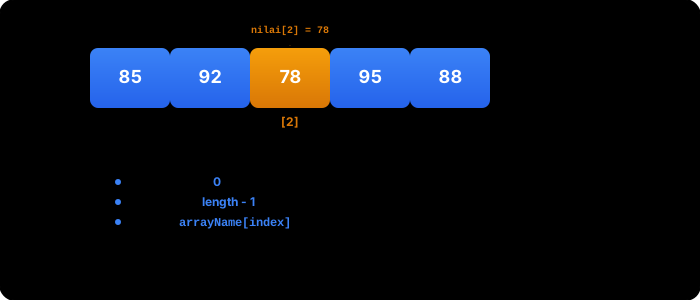
This is the most important thing you need to remember about arrays:
Array indices in C++ always start from 0, not 1!
  Element 1  →  index [0]
  Element 2  →  index [1]
  Element 3  →  index [2]
  ...
  Element N  →  index [N-1]
So if an array has 5 elements, the indices are 0, 1, 2, 3, 4. Not 1, 2, 3, 4, 5!
A way to remember: think of the index as the distance from the beginning. The first element is 0 away from the start, the second element is 1 away from the start, and so on. Like building floors in Europe — the ground floor is floor 0!
Example 2: Modifying Array Elements
#include <iostream>

int main() {
    int temp[5] = {30, 32, 28, 35, 31};

    std::cout << "Day 3 temperature (before): " << temp[2] << std::endl;

    // Change day 3 temperature
    temp[2] = 29;

    std::cout << "Day 3 temperature (after): " << temp[2] << std::endl;

    return 0;
}
Output:
Day 3 temperature (before): 28
Day 3 temperature (after): 29
Example 3: Arrays of Various Data Types
Arrays can store any data type — as long as all elements are the same type:
#include <iostream>
#include <string>

int main() {
    // Array of double
    double prices[4] = {15000.50, 25000.75, 8500.00, 12000.25};

    // Array of string
    std::string names[3] = {"Andi", "Budi", "Citra"};

    // Array of bool
    bool present[5] = {true, true, false, true, false};

    // Array of char
    char letters[4] = {'A', 'B', 'C', 'D'};

    // Print some elements
    std::cout << "Price #1  : Rp " << prices[0] << std::endl;
    std::cout << "Name #2   : " << names[1] << std::endl;
    std::cout << "Present #3: " << present[2] << std::endl;
    std::cout << "Letter #4 : " << letters[3] << std::endl;

    return 0;
}
Output:
Price #1  : Rp 15000.5
Name #2   : Budi
Present #3: 0
Letter #4 : D
Example 4: Calculating Array Length
You can calculate the number of array elements with the sizeof trick:
#include <iostream>

int main() {
    int numbers[] = {10, 20, 30, 40, 50, 60, 70};

    // sizeof(numbers) = total bytes of the entire array
    // sizeof(numbers[0]) = bytes of one element
    int length = sizeof(numbers) / sizeof(numbers[0]);

    std::cout << "Total array bytes : " << sizeof(numbers) << std::endl;
    std::cout << "Bytes per element : " << sizeof(numbers[0]) << std::endl;
    std::cout << "Number of elements: " << length << std::endl;

    return 0;
}
Output:
Total array bytes : 28
Bytes per element : 4
Number of elements: 7
sizeof(numbers) gives the total size of the array in bytes (7 elements x 4 bytes = 28 bytes). Divided by the size of one element (sizeof(numbers[0]) = 4 bytes), the result is the number of elements: 7.
Example 5: Test Scores for 5 Students
A more complete example — a simple report card program:
#include <iostream>
#include <string>

int main() {
    std::string names[5] = {"Andi", "Budi", "Citra", "Dewi", "Eka"};
    int scores[5] = {85, 92, 78, 95, 88};

    std::cout << "=== TEST SCORE LIST ===" << std::endl;
    std::cout << "-------------------------" << std::endl;

    for (int i = 0; i < 5; i++) {
        std::cout << names[i] << "\t: " << scores[i];

        if (scores[i] >= 90) {
            std::cout << " (A)";
        } else if (scores[i] >= 80) {
            std::cout << " (B)";
        } else if (scores[i] >= 70) {
            std::cout << " (C)";
        } else {
            std::cout << " (D)";
        }

        std::cout << std::endl;
    }

    return 0;
}
Output:
=== TEST SCORE LIST ===
-------------------------
Andi	: 85 (B)
Budi	: 92 (A)
Citra	: 78 (C)
Dewi	: 95 (A)
Eka	: 88 (B)
Out-of-Bounds Access: Very Dangerous!
What happens if you access an index that doesn’t exist?
#include <iostream>

int main() {
    int numbers[3] = {10, 20, 30};

    // Valid indices: 0, 1, 2
    std::cout << numbers[0] << std::endl;  // OK: 10
    std::cout << numbers[2] << std::endl;  // OK: 30

    // DANGER! Index out of bounds
    // std::cout << numbers[5] << std::endl;   // Undefined behavior!
    // std::cout << numbers[-1] << std::endl;  // Undefined behavior!

    return 0;
}
Accessing an array out of bounds causes undefined behavior. Your program could:
- Display garbage/random values
- Crash without an error message
- Appear to run normally but silently corrupt other data
- Behave differently each time it runs
C++ will not tell you if you use a wrong index! This is different from other languages that immediately throw an error. So you have to be extra careful on your own.
Example 6: Snack Price List
#include <iostream>
#include <string>

int main() {
    std::string snacks[] = {"Meatball", "Chicken Noodle", "Iced Tea", "Fried Snack", "Cilok"};
    int prices[] = {15000, 12000, 5000, 2000, 8000};
    int itemCount = sizeof(prices) / sizeof(prices[0]);

    std::cout << "=== SNACK PRICE LIST ===" << std::endl;

    for (int i = 0; i < itemCount; i++) {
        std::cout << i + 1 << ". " << snacks[i]
                  << " - Rp " << prices[i] << std::endl;
    }

    int total = 0;
    for (int i = 0; i < itemCount; i++) {
        total += prices[i];
    }

    std::cout << "----------------------------" << std::endl;
    std::cout << "Grand total: Rp " << total << std::endl;
    std::cout << "Average    : Rp " << total / itemCount << std::endl;

    return 0;
}
Output:
=== SNACK PRICE LIST ===
1. Meatball - Rp 15000
2. Chicken Noodle - Rp 12000
3. Iced Tea - Rp 5000
4. Fried Snack - Rp 2000
5. Cilok - Rp 8000
----------------------------
Grand total: Rp 42000
Average    : Rp 8400
Common Mistakes
1. Forgetting that indexing starts from 0
int arr[3] = {10, 20, 30};

// WRONG — the first element is not arr[1]!
std::cout << arr[1];  // This is the SECOND element (20), not the first!

// CORRECT — the first element is arr[0]
std::cout << arr[0];  // 10
2. Wrong access to the last element
int arr[5] = {1, 2, 3, 4, 5};

// WRONG — arr[5] is out of bounds! (valid indices: 0-4)
// std::cout << arr[5];  // Undefined behavior!

// CORRECT
std::cout << arr[4];  // 5 (last element)
3. Array size must be a constant
// WRONG in standard C++ (some compilers allow it, but it's not portable)
int n = 5;
// int arr[n];  // Variable-length array — not standard in C++!

// CORRECT — use a constant
const int N = 5;
int arr[N];  // OK!

// Or use a literal number directly
int arr2[5];  // OK!
4. Initializing with too many elements
// WRONG — 6 values for an array of size 5
// int arr[5] = {1, 2, 3, 4, 5, 6};  // Error!

// CORRECT
int arr[5] = {1, 2, 3, 4, 5};  // Exactly 5 elements
Exercises
Exercise 1: Create a program that stores daily temperatures for 7 days in an array. Display all temperatures, then calculate and display the average temperature.
Exercise 2: Create a program that stores 5 fruit names in a string array. Display all fruits with numbered order (1, 2, 3, …), then ask the user to enter a number and display the chosen fruit.
Exercise 3: Create a program with an array containing 10 numbers. Display the array in reverse order (from last element to first). Hint: use a backward loop from index length - 1 down to 0.
For Exercise 2, don’t forget to validate user input! If the user enters a number outside the range 1-5, display an error message. Remember, the user enters numbers 1-5 but the array indices are 0-4.
Array Index
Declare and Initialize an Array
Summary
| Concept | Explanation |
|---|---|
| Array | A collection of same-type data in one variable |
| Declaration | int arr[5]; or int arr[] = {1,2,3}; |
| Index | Starts from 0, not 1 |
| Element access | arr[0], arr[1], …, arr[N-1] |
| Modify element | arr[2] = 99; |
| Array length | sizeof(arr) / sizeof(arr[0]) |
| Empty initialization | int arr[5] = {}; (all become 0) |
| Out-of-bounds | Accessing an index beyond limits = undefined behavior |
| Various types | int, double, std::string, bool, char |
Now you can store lots of data in a single variable! But accessing elements one by one is still not very efficient. In the next lesson, you’ll learn how to combine arrays with loops — a super powerful combination!