If-Else
Up until now, all the programs we’ve written run straight from top to bottom — every line is executed one by one without exception. But useful programs need to be able to make decisions. “If the score is above 75, display Pass. Otherwise, display Fail.” This is where if and else come in!
Analogy: A Decision-Making Robot
Imagine you have a robot that’s about to go to school. Before leaving the house, the robot checks the weather:
Is it raining?
├── YES  → Bring an umbrella
└── NO   → No umbrella needed
That’s the essence of if-else — the robot (program) checks a condition, then chooses the appropriate action. Just like you every morning: if it’s raining, bring an umbrella. If not, just head out!
Basic if Statement
The simplest syntax:
if (condition) {
    // code to run if condition is true
}
The flow:
- Check the condition inside the parentheses
() - If
true— run the code inside the curly braces{} - If
false— skip that code block and continue to the next line
#include <iostream>

int main() {
    int temperature = 38;

    if (temperature > 37) {
        std::cout << "You have a fever! Get some rest." << std::endl;
    }

    std::cout << "Program finished." << std::endl;

    return 0;
}
Output:
You have a fever! Get some rest.
Program finished.
If you change temperature to 36, the output is just:
Program finished.The message “You have a fever!” is skipped because the condition 36 > 37 evaluates to false.
The if-else Statement
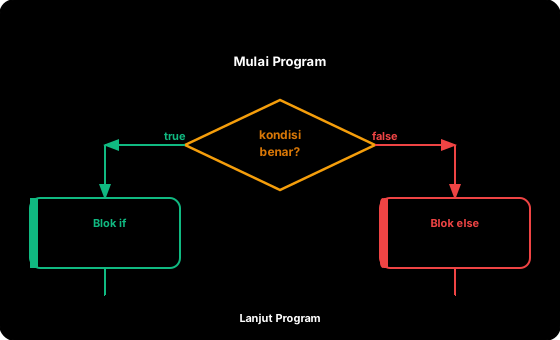
Often you need two paths: one if the condition is true, another if it’s false.
if (condition) {
    // code if true
} else {
    // code if false
}
Flow visualization:
         ┌──────────┐
         │ condition │
         └─────┬─────┘
          true/   \false
              /     \
     ┌───────┐     ┌───────┐
     │  if   │     │ else  │
     │ block │     │ block │
     └───┬───┘     └───┬───┘
         └──────┬──────┘
                │
         (program continues)
Example: Check Pass or Fail
#include <iostream>

int main() {
    int score = 80;
    int passingGrade = 75;

    if (score >= passingGrade) {
        std::cout << "Congratulations, you PASSED!" << std::endl;
    } else {
        std::cout << "Sorry, you didn't pass. Keep trying!" << std::endl;
    }

    return 0;
}
Output:
Congratulations, you PASSED!Example: Positive or Negative Number
#include <iostream>

int main() {
    int number = -5;

    if (number >= 0) {
        std::cout << number << " is a positive number (or zero)." << std::endl;
    } else {
        std::cout << number << " is a negative number." << std::endl;
    }

    return 0;
}
Output:
-5 is a negative number.Example: Even or Odd
#include <iostream>

int main() {
    int number = 7;

    if (number % 2 == 0) {
        std::cout << number << " is an even number." << std::endl;
    } else {
        std::cout << number << " is an odd number." << std::endl;
    }

    return 0;
}
Output:
7 is an odd number.The % (modulo) operator calculates the remainder of division. If number % 2 == 0, it means the number is evenly divisible by 2, i.e., it’s even. This is a very commonly used trick!
The if-else if-else Statement
Sometimes there aren’t just two choices. For example, you want to check whether a number is positive, negative, or zero — that’s three possibilities. Use else if to add more conditions:
if (condition1) {
    // code if condition1 is true
} else if (condition2) {
    // code if condition1 is false AND condition2 is true
} else if (condition3) {
    // code if condition1 & condition2 are false AND condition3 is true
} else {
    // code if ALL conditions above are false
}
Conditions are checked from top to bottom. As soon as one condition evaluates to true, its code block runs and the rest are all skipped. So the order of conditions matters!
Example: Positive, Negative, or Zero
#include <iostream>

int main() {
    int number = 0;

    if (number > 0) {
        std::cout << number << " is a positive number." << std::endl;
    } else if (number < 0) {
        std::cout << number << " is a negative number." << std::endl;
    } else {
        std::cout << "The number is zero." << std::endl;
    }

    return 0;
}
Output:
The number is zero.Example: Converting Scores to Grades
This is an example you’ll often encounter in school! Converting numeric scores to letter grades:
#include <iostream>

int main() {
    int score = 82;

    std::cout << "Score: " << score << std::endl;

    if (score >= 90) {
        std::cout << "Grade: A (Excellent)" << std::endl;
    } else if (score >= 80) {
        std::cout << "Grade: B (Good)" << std::endl;
    } else if (score >= 70) {
        std::cout << "Grade: C (Fair)" << std::endl;
    } else if (score >= 60) {
        std::cout << "Grade: D (Poor)" << std::endl;
    } else {
        std::cout << "Grade: E (Very Poor)" << std::endl;
    }

    return 0;
}
Output:
Score: 82
Grade: B (Good)
Notice: the score 82 is also >= 70 and >= 60, but since conditions are checked from the top and 82 >= 80 is the first condition that’s true, the “Grade: B” block runs. The rest are skipped.
Example: Age Categories
#include <iostream>

int main() {
    int age = 15;

    std::cout << "Age: " << age << " years" << std::endl;

    if (age < 5) {
        std::cout << "Category: Toddler" << std::endl;
    } else if (age < 13) {
        std::cout << "Category: Child" << std::endl;
    } else if (age < 18) {
        std::cout << "Category: Teenager" << std::endl;
    } else if (age < 60) {
        std::cout << "Category: Adult" << std::endl;
    } else {
        std::cout << "Category: Senior" << std::endl;
    }

    return 0;
}
Output:
Age: 15 years
Category: Teenager
Nested If
You can also put an if inside another if. This is called a nested if:
#include <iostream>

int main() {
    int score = 85;
    bool submittedAssignment = true;

    if (score >= 75) {
        if (submittedAssignment) {
            std::cout << "Passed with a good score!" << std::endl;
        } else {
            std::cout << "Score is sufficient, but assignment not submitted." << std::endl;
        }
    } else {
        std::cout << "Score is below the passing grade." << std::endl;
    }

    return 0;
}
Output:
Passed with a good score!Nested if is useful, but don’t go too deep (more than 2-3 levels). If there are too many, the code becomes hard to read. In the next lesson, you’ll learn logical operators (&&, ||) that can combine multiple conditions without nesting.
Fun Example: Robot Goes to School
#include <iostream>

int main() {
    bool raining = true;
    bool hasExam = true;
    int currentHour = 6;

    std::cout << "=== Robot Goes to School ===" << std::endl;
    std::cout << "Raining: " << raining << std::endl;
    std::cout << "Has exam: " << hasExam << std::endl;
    std::cout << "Current hour: " << currentHour << std::endl;
    std::cout << std::endl;

    // Check if it's time to leave
    if (currentHour < 6) {
        std::cout << "Still too early. Go back to sleep." << std::endl;
    } else if (currentHour > 7) {
        std::cout << "Oh no, already late! Hurry up!" << std::endl;
    } else {
        std::cout << "Time to go to school." << std::endl;

        // Check weather
        if (raining) {
            std::cout << "Bring an umbrella!" << std::endl;
        } else {
            std::cout << "Clear weather, no umbrella needed." << std::endl;
        }

        // Check exam
        if (hasExam) {
            std::cout << "Don't forget your stationery and review on the way!" << std::endl;
        }
    }

    return 0;
}
Output:
=== Robot Goes to School ===
Raining: 1
Has exam: 1
Current hour: 6

Time to go to school.
Bring an umbrella!
Don't forget your stationery and review on the way!
Common Mistakes
1. Forgetting curly braces {}
If you don’t use {}, only one line after if is part of the conditional block:
int score = 50;

// DANGEROUS -- without curly braces
if (score >= 75)
    std::cout << "Passed!" << std::endl;
    std::cout << "Congratulations!" << std::endl;  // This line ALWAYS runs!
The “Congratulations!” line will always appear, even if the score is less than 75, because only the first line is inside the if. The solution: always use {}.
// CORRECT -- use curly braces
if (score >= 75) {
    std::cout << "Passed!" << std::endl;
    std::cout << "Congratulations!" << std::endl;
}
Always use curly braces {}, even if the code block is only one line. This prevents bugs that are very hard to find!
2. Using = instead of == in conditions
int x = 5;

// WRONG -- this CHANGES x to 10, not a comparison!
if (x = 10) {
    std::cout << "x is 10" << std::endl;
}

// CORRECT -- this COMPARES x with 10
if (x == 10) {
    std::cout << "x is 10" << std::endl;
}
3. Semicolon after if
// WRONG -- the semicolon makes the if "empty"
if (score >= 75); {
    std::cout << "Passed!" << std::endl;  // Always runs!
}

// CORRECT -- no semicolon after the condition
if (score >= 75) {
    std::cout << "Passed!" << std::endl;
}
4. Conditions that are always true or always false
int age = 20;

// This is always true because age is already set to 20
if (age == 20) {
    std::cout << "Age is 20" << std::endl;
}

// If you want to check user input, we use cin (from Unit 1)
Check Pass or Fail
If-Else Condition Check
Exercises
Exercise 1: Write a program that stores a water temperature in a double variable. Then display:
- If the temperature is
<= 0: “Water is freezing (ice)” - If the temperature is
>= 100: “Water is boiling (steam)” - Otherwise: “Water is in liquid state”
Exercise 2: Write a more detailed score conversion program. Store a score (0-100) in an int variable, then display:
- 90-100: “A (Outstanding)”
- 80-89: “B (Very Good)”
- 70-79: “C (Good)”
- 60-69: “D (Fair)”
- 0-59: “E (Needs Improvement)”
Exercise 3: Write a program that checks whether a year is a leap year. The rules: a year divisible by 4 is a leap year, EXCEPT those divisible by 100 (not a leap year), EXCEPT those divisible by 400 (leap year again). Examples: 2024 is a leap year, 1900 is not, 2000 is a leap year.
For Exercise 3, think about the correct order of checks. Start from the most specific condition (divisible by 400) to the most general.
Summary
| Concept | Explanation |
|---|---|
if | Runs a code block if the condition is true |
if-else | Two paths: one for true, one for false |
else if | Adds additional conditions between if and else |
| Nested if | if inside if — for multi-level checks |
{ } | Curly braces mark a code block — always use them |
| Condition order | Checked from top to bottom, stops at the first true condition |
= vs == | Don’t mix them up! = is assignment, == is comparison |
| Semicolons | Don’t put ; after if (condition) |
Now your program can make decisions! But what if you need to check multiple conditions at once? For example, “If age is over 17 AND has a driver’s license”? In the next lesson, we’ll learn logical operators to combine conditions.