What Are Functions?
Imagine you need to write code to display a separator line ================ in 10 different places in your program. Would you want to copy-paste it 10 times? Of course not! This is where functions come to save your life.
Analogy: Function = Recipe
Imagine you have a fried rice recipe. The recipe is written once in a cookbook, but you can cook fried rice anytime simply by following that recipe. You don’t need to rewrite the recipe every time you want to cook!
Fried Rice Recipe (ingredients: rice, egg, soy sauce):
  1. Heat the oil
  2. Add egg, scramble it
  3. Add rice
  4. Add soy sauce
  5. Stir evenly
  6. Serve!
In programming, a function is exactly like a recipe:
- Recipe name = function name
- Ingredients = function parameters
- Steps = function body
- Finished dish = return value
You write the recipe (function) once, then you can “cook” (call) it as many times as you want!
Why Are Functions Important? (DRY Principle)
There’s an important principle in programming called DRY — Don’t Repeat Yourself.
Look at this code without functions:
#include <iostream>

int main() {
    // Print separator line #1
    std::cout << "================================" << std::endl;
    std::cout << "Welcome!" << std::endl;

    // Print separator line #2
    std::cout << "================================" << std::endl;
    std::cout << "Main Menu" << std::endl;

    // Print separator line #3
    std::cout << "================================" << std::endl;
    std::cout << "Thank You!" << std::endl;

    // Print separator line #4
    std::cout << "================================" << std::endl;

    return 0;
}
The line std::cout << "================================" is written 4 times! If someday you want to change the line length, you’d have to edit it in 4 places. That’s error-prone and typo-prone.
With a function, you only need to write it once:
#include <iostream>

void printLine() {
    std::cout << "================================" << std::endl;
}

int main() {
    printLine();
    std::cout << "Welcome!" << std::endl;

    printLine();
    std::cout << "Main Menu" << std::endl;

    printLine();
    std::cout << "Thank You!" << std::endl;

    printLine();

    return 0;
}
Output:
================================
Welcome!
================================
Main Menu
================================
Thank You!
================================
Much cleaner, right? Want to change the line to --------? Just edit one place in the printLine() function.
Anatomy of a Function
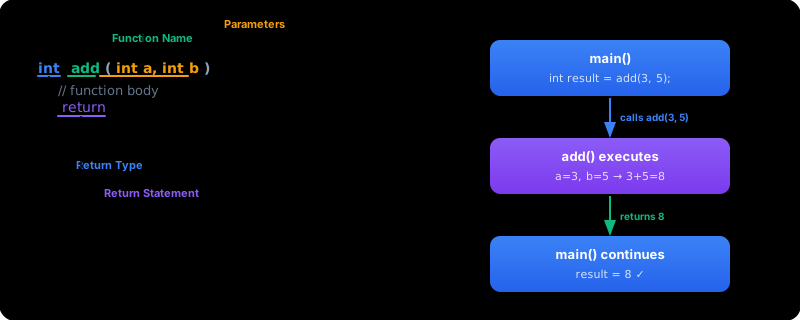
Every function has important parts. Let’s break it down:
int calculateSquareArea(int side) {
    int area = side * side;
    return area;
}
int calculateSquareArea (int side) { ... return area; }
^^^ ^^^^^^^^^^^^^^^^^^^ ^^^^^^^^^^ ^^^^^^^^^^^^^^^^^^^
Return Type Function Name Parameter Body (function contents)| Part | Description | Example |
|---|---|---|
| Return type | The data type of the value returned | int |
| Function name | The function’s identity, used when calling it | calculateSquareArea |
| Parameter | ”Ingredients” that the function needs | int side |
| Body | Code that runs when the function is called | { int area = side * side; ... } |
| Return statement | Sends a value back to the caller | return area; |
Declaration vs Definition vs Call
These three things often confuse beginners. Let’s distinguish them:
#include <iostream>

// 1. DECLARATION (prototype) — a "promise" that this function exists
int timesTwo(int number);

int main() {
    // 3. CALL — using the function
    int result = timesTwo(5);
    std::cout << "5 x 2 = " << result << std::endl;

    return 0;
}

// 2. DEFINITION — the complete function body
int timesTwo(int number) {
    return number * 2;
}
Output:
5 x 2 = 10| Term | What it does | Example |
|---|---|---|
| Declaration (prototype) | Tells the compiler this function exists | int timesTwo(int number); |
| Definition | Writes the complete function body | int timesTwo(int number) { return number * 2; } |
| Call | Uses/executes the function | timesTwo(5) |
A declaration ends with a semicolon (;), while a definition is followed by curly braces { } containing code. Don’t mix them up!
void Functions vs Functions that Return Values
There are two types of functions based on whether they return a value or not:
void Functions — Don’t return a value
void functions only do something without giving a result back. Like telling your sibling “please clean the table” — they do it, but they don’t give you anything back.
#include <iostream>

void greet(std::string name) {
    std::cout << "Hello, " << name << "! Happy learning C++!" << std::endl;
}

int main() {
    greet("Andi");
    greet("Budi");
    greet("Citra");

    return 0;
}
Output:
Hello, Andi! Happy learning C++!
Hello, Budi! Happy learning C++!
Hello, Citra! Happy learning C++!
Functions that Return Values — Produce a result
These functions produce something that you can store or use. Like asking your friend “what’s 5 + 3?” and they answer “8”.
#include <iostream>

int calculateSquareArea(int side) {
    return side * side;
}

int main() {
    int area1 = calculateSquareArea(5);
    int area2 = calculateSquareArea(10);

    std::cout << "Area of square with side 5: " << area1 << std::endl;
    std::cout << "Area of square with side 10: " << area2 << std::endl;

    return 0;
}
Output:
Area of square with side 5: 25
Area of square with side 10: 100
You’ve Already Been Using Functions!
Without realizing it, you’ve actually been using functions since you started learning C++! Built-in C++ functions you’ve used before:
#include <iostream>
#include <cmath>
#include <algorithm>

int main() {
    // std::sqrt — calculates square root (from <cmath>)
    double root = std::sqrt(25.0);
    std::cout << "Square root of 25 = " << root << std::endl;

    // std::abs — absolute value (from <cmath>)
    int absolute = std::abs(-7);
    std::cout << "|-7| = " << absolute << std::endl;

    // std::max — largest value of two numbers (from <algorithm>)
    int largest = std::max(10, 20);
    std::cout << "Max(10, 20) = " << largest << std::endl;

    // std::min — smallest value of two numbers (from <algorithm>)
    int smallest = std::min(10, 20);
    std::cout << "Min(10, 20) = " << smallest << std::endl;

    return 0;
}
Output:
Square root of 25 = 5
|-7| = 7
Max(10, 20) = 20
Min(10, 20) = 10
Even main() itself is a function! A special function that is automatically called when the program runs. Its return type is int, and return 0 means “the program ran successfully”.
Complete Example: Simple Menu
#include <iostream>

void printLine() {
    std::cout << "================================" << std::endl;
}

void printHeader(std::string title) {
    printLine();
    std::cout << "  " << title << std::endl;
    printLine();
}

void printMenu() {
    printHeader("SCHOOL CAFETERIA");
    std::cout << "  1. Fried Rice    - $3.00" << std::endl;
    std::cout << "  2. Chicken Noodle - $2.50" << std::endl;
    std::cout << "  3. Iced Tea      - $1.00" << std::endl;
    printLine();
}

int main() {
    printMenu();
    return 0;
}
Output:
================================
  SCHOOL CAFETERIA
================================
  1. Fried Rice    - $3.00
  2. Chicken Noodle - $2.50
  3. Iced Tea      - $1.00
================================
Notice how a function can call another function! printMenu() calls printHeader(), which calls printLine(). This makes the code very modular and clean.
Common Mistakes
1. Calling a function before it’s declared
#include <iostream>

int main() {
    greet("Andi");  // ERROR! Compiler doesn't know about the greet function yet
    return 0;
}

void greet(std::string name) {
    std::cout << "Hello, " << name << "!" << std::endl;
}
Solution: add a declaration (prototype) above main, or move the function definition above main.
2. Forgetting return in a non-void function
// WRONG — forgot return!
int calculateArea(int side) {
    int area = side * side;
    // No return... the result is undefined!
}

// CORRECT
int calculateArea(int side) {
    int area = side * side;
    return area;
}
3. Using the return value of a void function
void greet(std::string name) {
    std::cout << "Hello, " << name << "!" << std::endl;
}

int main() {
    // WRONG — void function doesn't return anything!
    // std::string result = greet("Andi");

    // CORRECT — just call it without storing the result
    greet("Andi");

    return 0;
}
The compiler may not always give an error if you forget return in a non-void function, but your program will behave unpredictably. Always make sure every code path in a non-void function has a return!
Exercises
Exercise 1: Create a function void printStars(int count) that prints stars (*) as many as count on a single line. Then call the function from main with counts of 5, 10, and 3.
Example output:
*****
**********
***
Exercise 2: Create a function int square(int number) that returns the square of a number. Use the function to display the squares of 1 through 5.
Example output:
1 squared = 1
2 squared = 4
3 squared = 9
4 squared = 16
5 squared = 25
Exercise 3: Create a program with three functions:
void printLine()— prints a line--------------------void printTitle(std::string text)— prints a title between two linesint calculateTotal(int price, int quantity)— returns price * quantity
Use all three functions to display a simple receipt.
The Main Benefit of Functions
Calling printLine Twice
Summary
| Concept | Description |
|---|---|
| Function | A named code block that can be called multiple times |
| DRY Principle | Don’t Repeat Yourself — avoid code duplication |
| Return type | The data type returned by the function (int, double, void, etc.) |
| Parameter | ”Ingredients” received by the function when called |
| Body | The function’s contents inside curly braces { } |
return | Sends a value back to the caller |
void | A function that doesn’t return a value |
| Declaration | Tells the compiler the function exists (ends with ;) |
| Definition | The complete function body (followed by { }) |
| Call | Executes the function with functionName(arguments) |
Now you know what functions are and why they’re important. In the next lesson, we’ll learn how to create your own functions from scratch in more detail!