Comparison Operators
In everyday life, you often compare things, right? “Is my grade above the passing threshold?”, “Am I old enough to get a driver’s license?”, “Is the price of meatballs at cafeteria A the same as cafeteria B?” Well, in C++ we can also compare values — and the result is always true or false.
Analogy: Scales and Rulers
Think of comparison operators like scales or rulers. You place two objects, then ask: “Which one is heavier?”, “Are they the same length?”, “Is the left one shorter?” The answer is always yes (true) or no (false).
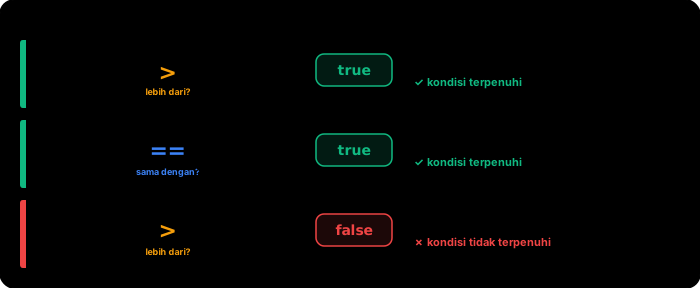
   ┌─────┐         ┌─────┐
   │  5  │   >?    │  3  │    Answer: true (yes, 5 is greater than 3)
   └─────┘         └─────┘

   ┌─────┐         ┌─────┐
   │  7  │   ==?   │  7  │    Answer: true (yes, both are equal)
   └─────┘         └─────┘

   ┌─────┐         ┌─────┐
   │  2  │   >?    │  8  │    Answer: false (no, 2 is not greater than 8)
   └─────┘         └─────┘
The 6 Comparison Operators in C++
C++ has 6 operators for comparing two values:
| Operator | Meaning | Example | Result |
|---|---|---|---|
== | Equal to | 5 == 5 | true |
!= | Not equal to | 5 != 3 | true |
< | Less than | 3 < 7 | true |
> | Greater than | 10 > 4 | true |
<= | Less than or equal to | 5 <= 5 | true |
>= | Greater than or equal to | 8 >= 10 | false |
Comparison Result: bool
Remember the bool data type from Unit 1? All comparison operators produce a bool value — either true or false. On screen, true is displayed as 1 and false as 0.
#include <iostream>

int main() {
    std::cout << (5 == 5) << std::endl;   // 1 (true)
    std::cout << (5 == 3) << std::endl;   // 0 (false)
    std::cout << (10 > 7) << std::endl;   // 1 (true)
    std::cout << (2 > 9) << std::endl;    // 0 (false)

    return 0;
}
Output:
1
0
1
0
Why use parentheses () inside cout? Because the << operator has higher priority than comparison operators. Without parentheses, the compiler will get confused. So always wrap comparisons in parentheses when using them with cout.
Storing Comparison Results
You can store comparison results in a bool variable:
#include <iostream>

int main() {
    int examScore = 85;
    int passingGrade = 75;

    bool passed = examScore >= passingGrade;

    std::cout << "Exam score: " << examScore << std::endl;
    std::cout << "Passing grade: " << passingGrade << std::endl;
    std::cout << "Passed: " << passed << std::endl;  // 1 (true)

    return 0;
}
Output:
Exam score: 85
Passing grade: 75
Passed: 1
Practical Example: Comparing Ages
#include <iostream>

int main() {
    int andiAge = 17;
    int budiAge = 15;

    std::cout << "Andi's age: " << andiAge << std::endl;
    std::cout << "Budi's age: " << budiAge << std::endl;
    std::cout << std::endl;

    std::cout << "Is Andi older than Budi? " << (andiAge > budiAge) << std::endl;
    std::cout << "Are their ages the same? " << (andiAge == budiAge) << std::endl;
    std::cout << "Is Andi at least 17? " << (andiAge >= 17) << std::endl;
    std::cout << "Is Budi under 17? " << (budiAge < 17) << std::endl;

    return 0;
}
Output:
Andi's age: 17
Budi's age: 15

Is Andi older than Budi? 1
Are their ages the same? 0
Is Andi at least 17? 1
Is Budi under 17? 1
Practical Example: Comparing Game Scores
#include <iostream>

int main() {
    int scorePlayer1 = 4500;
    int scorePlayer2 = 4500;
    int highScore = 5000;

    std::cout << "Player 1: " << scorePlayer1 << std::endl;
    std::cout << "Player 2: " << scorePlayer2 << std::endl;
    std::cout << "High Score: " << highScore << std::endl;
    std::cout << std::endl;

    std::cout << "Tied score? " << (scorePlayer1 == scorePlayer2) << std::endl;
    std::cout << "Player 1 broke the record? " << (scorePlayer1 > highScore) << std::endl;
    std::cout << "Player 2 hasn't broken the record? " << (scorePlayer2 <= highScore) << std::endl;

    return 0;
}
Output:
Player 1: 4500
Player 2: 4500
High Score: 5000

Tied score? 1
Player 1 broke the record? 0
Player 2 hasn't broken the record? 1
Practical Example: Temperature Check
#include <iostream>

int main() {
    double bodyTemp = 37.8;
    double feverThreshold = 37.5;

    std::cout << "Body temperature: " << bodyTemp << " C" << std::endl;
    std::cout << "Fever threshold: " << feverThreshold << " C" << std::endl;
    std::cout << "Has a fever? " << (bodyTemp > feverThreshold) << std::endl;

    return 0;
}
Output:
Body temperature: 37.8 C
Fever threshold: 37.5 C
Has a fever? 1
Common Mistakes
1. Using = instead of ==
This is the most common mistake for beginners! Remember:
=means assigning a value (assignment)==means comparing (comparison)
int x = 5;

// WRONG -- this changes x to 10, not a comparison!
// x = 10;

// CORRECT -- this compares whether x equals 10
// x == 10;
= and == are two very different things! A single equals sign (=) means “store this value”. Two equals signs (==) means “are these two values the same?” Don’t mix them up!
2. Comparing different data types
int a = 5;
double b = 5.0;

// This will work, but be careful with decimal numbers
std::cout << (a == b) << std::endl;  // 1 (true), because 5 == 5.0
Comparing int with double is usually safe for simple numbers. But be careful with decimal calculations — sometimes 0.1 + 0.2 is not exactly 0.3 due to how computers store decimal numbers.
3. Forgetting parentheses in cout
// WRONG -- compiler gets confused
// std::cout << 5 > 3 << std::endl;

// CORRECT -- use parentheses
std::cout << (5 > 3) << std::endl;
Correct Comparison Operator
Comparison Result Output
Exercises
Exercise 1: Write a program that declares two int variables containing the heights (in cm) of two friends. Then display comparison results: who is taller, whether their heights are the same, and whether each is above 160 cm.
Exercise 2: Write a program that stores the prices of two items in double variables. Compare their prices and display:
- Are the prices the same?
- Is the first item cheaper?
- Is the second item’s price above 50000?
Exercise 3: Declare a variable int age and int minAge = 12. Store the result of age >= minAge in a bool canEnter variable, then display the result.
Summary
| Concept | Explanation |
|---|---|
== | Equal to — checks whether two values are identical |
!= | Not equal to — checks whether two values are different |
< | Less than |
> | Greater than |
<= | Less than or equal to |
>= | Greater than or equal to |
| Comparison result | Always bool — true (1) or false (0) |
= vs == | = for assigning values, == for comparing |
Parentheses in cout | Always wrap comparisons with () inside cout |
Now you know how to compare values! In the next lesson, we’ll use these comparison results to make decisions in programs using if and else.